Connect GitHub
Connecting GitHub is how OpsRadar finds your services in the first place — it's the starting point for the service catalog, compliance scoring, and everything downstream.
Connect
- Go to Integrations and find the GitHub card.
- Click Connect. If GitHub is already connected, this button reads Manage instead (or Review if the connection has an error).
- Choose how to connect:
- Install OpsRadar Connector for Github — the recommended path. This installs OpsRadar's GitHub App.
- Use a token — connect with a personal access token instead.
- For the App install: click Install OpsRadar Connector for Github, then on GitHub's install page, select the organization or account and choose which repositories OpsRadar can access. Click Install & Authorize — you'll be redirected back to OpsRadar automatically.
- OpsRadar shows Waiting for provider… while the installation completes, then Account connected! once it's done.
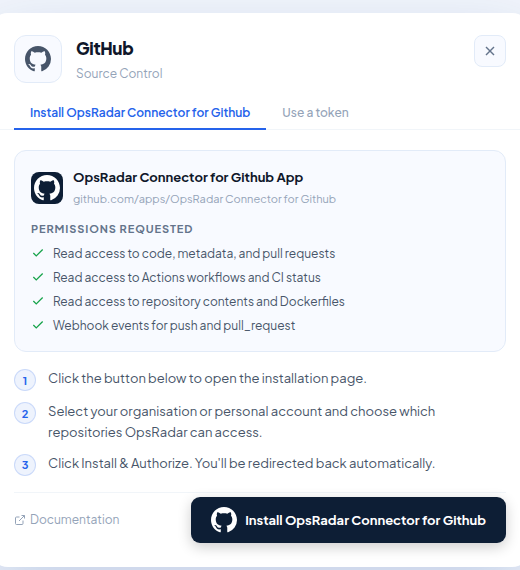
Permissions requested
The GitHub App asks for:
- Read access to code, metadata, and pull requests
- Read access to Actions workflows and CI status
- Read access to repository contents and Dockerfiles
- Webhook events for push and pull_request
All of it is read-only — connecting GitHub doesn't give OpsRadar write access to your repositories.
What happens next
The connection is org-level, not per-user — any teammate with integration permissions can manage it, and it applies to the whole OpsRadar organization, not just the person who connected it.
As soon as the connection succeeds, OpsRadar fetches the repositories covered by the installation and starts evaluating them. Anything that looks like a service but isn't in your registry yet shows up as a service candidate — see Review service candidates for what to do with those.
If something goes wrong
- Already connected — OpsRadar rejects a duplicate connection for the same GitHub installation or org rather than creating a second one.
- Installation error — recoverable errors offer Retry connection; errors that need a fresh install prompt you to remove and reinstall the App from GitHub's side.
- Disconnecting — you can disconnect an account at any time. It's reversible: reconnecting picks back up where you left off.