Review service candidates
Once GitHub (or a connected Kubernetes cluster) is in, OpsRadar doesn't add services to your registry automatically — it proposes them as candidates for you to confirm, reject, or merge.
What a candidate is
A candidate is something OpsRadar noticed that looks like a service but isn't
in your registry yet — detected from an opsradar.yml file, a build manifest,
or a Dockerfile in a connected repository. Each one comes with:
- A suggested name, language, framework, and an AI-generated description
- A suggested owning team, with a Why? breakdown showing which teams' commits it's based on
- A suggested match if it looks like an existing registry service, with a match score
Where to review them
- Service candidates page — the primary place, under Registry. It lists everything Awaiting review with a count badge.
- Notifications panel — new candidates also surface here for quick triage, with the same accept/reject actions in a lighter-weight card.
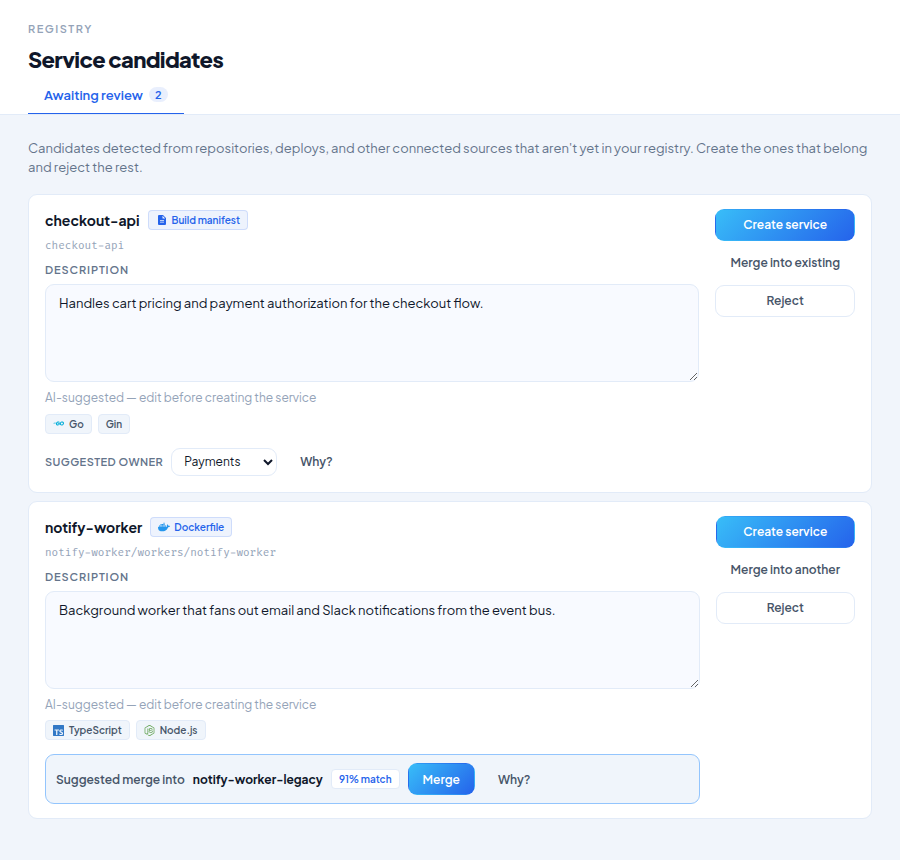
Reviewing a candidate
For each candidate you can:
- Create service — confirms the candidate and adds it to your registry using the suggested details. Edit the description first if the AI-suggested one isn't right — there's a hint reminding you to review it before creating. You can also accept or override the suggested owning team.
- Merge into existing — if OpsRadar suggested a match (or you pick one yourself), this links the candidate's source instead of creating a duplicate service.
- Reject — dismisses the candidate. Nothing is created.
After you confirm
A confirmed candidate doesn't just land in the catalog — it's immediately evaluated against every compliance rule in your organization, so it shows up with a real compliance score from the start rather than sitting unscored until the next scan.